О компанииУсловияКонфиденциальностьКонтакт
 
Обновление
SilentBonusTrack

SilentBonusTrack

Выпуск: 2014-01-17
© Motonari Hibi
SilentBonusTrack - QR Code
Версия 2.4.9
4+
Загрузите в App Store
Версия 2.4.9
4+
Загрузите в App Store
Выпуск: 2014-01-17
© Motonari Hibi

Снимки экрана iPhone

Скриншот
Скриншот
Скриншот
Скриншот
Скриншот
Скриншот
Скриншот

Снимки экрана iPad

Скриншот
Скриншот
Скриншот
Скриншот
Скриншот
Скриншот

Описание

This is a cassette player for albums.
I have reproduced experiences of listening music with a cassette tape.
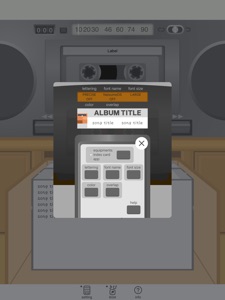
For example, changing rotation speed of reels based on tape amount, animation of wrapping end of the tape to reels, the player with counter and auto reversing, a sound of operation, song list like cassette index cards, lettering album title.
Would you listen to albums like you did in old days?
What you can do
You can strain to hear before the first song starts.
On skip operation, The tape may run over the position you want to set at.
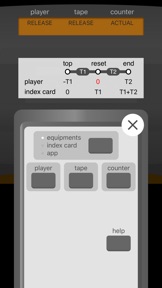
You can skip efficiently with referring the counter.
If difference occur in counter, you have to back to top of side A and push the reset button.(*)
While you see the song list, you can realize which order the current song is on its side, and connections to a previous or next song.
You can switch a song experimentally by pressing the button to play the other side.
If you cannot get a current song name, you can infer which song is playing from the amount of tape on each reel.
You can look at the tape that seems to be about to end but doesn’t readily end.
The sound of changing side makes you feel renewing and expectations of a new side.
You have to push the start button again if auto reverse doesn’t work as the setting.
With albums released in CD, you can bother which boundary separates it into A and B.
You can verify changing speed of rotation while fwd or rev processes.
You can be deep in lingering of the album with reels rounding after the last song played.
The mechanical sound at end of tape makes you feel a sense of achievement and a little missing.
(*)The ways that avoid time and trouble are included.
How to use
Select an album and play it.
Features
An album is divided into two sides automatically.
If a result of auto dividing is not desirable, songs can be transferred by an operation.
Auto reverse(none, A to B only, both ways).
Index cards represent song information as cassette tapes do.
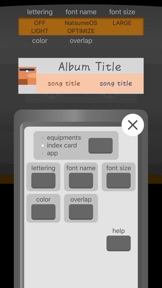
You can now use handwritten fonts for the characters of index cards.
Selecting an album at random If you do with “random” button.
Index card colors are sourced from album artworks.
Album title lettering which is like a printing sheet.
Caution
This app imports music included in the device as an album. Cloud sources don’t be selected.
The button drawn right direction on the player is assigned playing side A. Left direction is side B.
Auto dividing executes as even as possible. A result of dividing may differ from actual dividing of an album.
You can’t change song order.
This app plays songs with using the iPod function on iOS. Another app using it as same may courses problems.
Playing time is one minute longer than displayed time.(In case of 46minutes tape, each side has 23+1=24minutes)
Lengths of tapes are about 10 kinds as actual. Albums having over 120 minutes songs are added a few blank minutes.
After you change song division, the length of tape change to fit time.
This app uses year data set in a song. If a set year is newer and an actual year is older, it is treated as a new one.
When an album you played once is selected, it is set the previous position. But you can’t know which side played last time.
Sound effects like tapes(hiss noise, warm high frequency) don't be installed.
About playing in background
You can listen to music behind another app by two ways.
1: Close this app by pushing the home button(as you usually do) - it plays songs in the current side only.
2: Before you close this app, change to BGM mode - it plays blank time after the last song, plays machine sound at end of side, obeys setting of auto-reverse. To change to BGM mode, you tap the button(drawn browser and musical notes) in the bottom while playing a song. In case setting of auto-reverse is endless, it plays whole songs a few times.
While you listen to an album with a tape, blank time is part of it. This is the concept.
This app divides the album into side A and B and adds blank time on each end.

Что нового в версии 2.4.9

App size reduction

Продавец

Название

Motonari Hibi

Адрес страницы

Информация

Разработчик

Категории

Версия

2.4.9

Размер

15,5 MB

Game Center

Нет

VPP Device Licensing

Да

Рейтинг

Ограничение: 4+

Совместимость

iOS 12.4 или позже

Устройства

iPhone 5s, iPhone 6, iPhone 6 Plus, iPhone 6s, iPhone 6s Plus, iPhone SE, iPhone 7, iPhone 7 Plus, iPhone 8, iPhone 8 Plus, iPhone X, iPhone XR, iPhone XS, iPhone XS Max, iPhone 11, iPhone 11 Pro, iPhone 11 Pro Max, iPhone SE (2-го поколения), iPhone 12, iPhone 12 Pro, iPhone 12 Pro Max, iPhone 12 mini, iPhone 13, iPhone 13 Pro, iPhone 13 Pro Max, iPhone 13 mini, iPhone SE (3-го поколения), iPhone 14, iPhone 14 Plus, iPhone 14 Pro, iPhone 14 Pro Max, iPhone 15, iPhone 15 Plus, iPhone 15 Pro, iPhone 15 Pro Max, iPhone 16, iPhone 16Plus, iPhone 16Pro, iPhone 16ProMax, iPad (5-го поколения) Wi-Fi, iPad (5-го поколения) Wi-Fi + Cellular, iPad (6-го поколения) Wi-Fi, iPad (6-го поколения) Wi-Fi + Cellular, iPad Pro, iPad Pro (Cellular), iPad Pro (9,7-дюймовый), iPad Pro (9,7-дюймовый) (Cellular), iPad Pro (12,9 дюйма, 2-го поколения), iPad Pro (12,9 дюйма, 2-го поколения) Wi-Fi + Cellular, iPad Pro (10,5 дюйма), iPad Pro (10,5 дюйма) Wi-Fi + Cellular., iPad Pro (11 дюйма), iPad Pro (11 дюйма) Wi-Fi + Cellular., iPad Pro (12,9 дюйма, 3-го поколения), iPad Pro (12,9 дюйма, 3-го поколения) Wi-Fi + Cellular, iPad Air, iPad Air (Cellular), iPad Air 2, iPad Air 2 (Cellular), iPad Air (3-го поколения), iPad Air (3-го поколения) Wi-Fi + Cellular, iPad mini Retina, iPad mini Retina (Cellular), iPad mini 3, iPad mini 3 (Cellular), iPad mini 4, iPad mini 4 (Cellular), iPad mini (5-го поколения), iPad mini (5-го поколения) Wi-Fi + Cellular, iPad (7-го поколения) Wi-Fi + Cellular, iPad Pro (11 дюймов, 2-го поколения), iPad Pro (11 дюймов, 2-го поколения) (Wi-Fi + Cellular), iPad Pro (12,9 дюйма, 4-го поколения), iPad Pro (12,9 дюйма, 4-го поколения) (Wi-Fi + Cellular), iPad Air (4-го поколения) (Wi-Fi), iPad Air (4-го поколения) (Wi-Fi + Cellular), iPad (8-го поколения) Wi-Fi, iPad (8-го поколения) Wi-Fi + Cellular, iPad Pro (11 дюймов, 3-го поколения), iPad Pro (11 дюймов, 3-го поколения) (Wi-Fi + Cellular), iPad Pro (12,9 дюйма, 5-го поколения), iPad Pro (12,9 дюйма, 5-го поколения) (Wi-Fi + Cellular), iPad (9-го поколения), iPad (9-го поколения) Wi-Fi + Cellular, iPad mini (6-го поколения), iPad mini (6-го поколения) Wi-Fi + Cellular, iPad Air (5-го поколения), iPad Air (5-го поколения) Wi-Fi + Cellular, iPad Pro (11 дюймов, 4-го поколения), iPad Pro (11 дюймов, 4-го поколения) (Wi-Fi + Cellular), iPad Pro (12,9 дюймов, 6-го поколения), iPad Pro (12,9 дюймов, 6-го поколения) (Wi-Fi + Cellular), iPad (10-го поколения), iPad (10-го поколения) (Wi-Fi + Cellular), iPad Air (11 дюймов, M2, Wi-Fi), iPad Air (13 дюймов, M2, Wi-Fi), iPad Air (13 дюймов, M2, Wi-Fi + Cellular), iPad Pro (11 дюймов, M4, Wi-Fi), iPad Pro (11 дюймов, M4, Wi-Fi + Cellular), iPad Pro (13 дюймов, M4, Wi-Fi), iPad Pro (13 дюймов, M4, Wi-Fi + Cellular), iPad MiniA17Pro, iPad MiniA17ProCellular, iPod touch (6-го поколения), iPod touch (7-го поколения)

Языки

английский, японский

App Store: Оценки покупателей

Оценки и отзывы

3,0 из 5 (1 Рейтинг)

App Store: Отзывы покупателей

2015-11-29

Please add several well-known cassette designs

Please add several well-known cassette designs, like Maxell XL-II (with square window at center), Sony UX-S and UX-Pro, TDK SA (various designs), SA-X, AR, MA, DENON HD8 (HD-M) and CR-II, BASF CS-II.
Also, we need the mode for both iPhone and iPad where a cassette is more or less the same size as in reality. On the small iPhone's screen it will occupy entire screen and you may add a couple of overlay buttons to return to the SBT main view. (Refer to the DeliTape app for iPhone for the correct size.)
snusmumric
Версия 1.2.3