О компанииУсловияКонфиденциальностьКонтакт
 
Обновление
QuickPlan - Project Gantt Plan

QuickPlan - Project Gantt Plan

Выпуск: 2013-10-20
© 2013 ~ 2023 Swift Apps Group
QuickPlan - Project Gantt Plan - QR Code
Версия 17.0
4+
Загрузите в App Store
Версия 17.0
4+
Загрузите в App Store
Выпуск: 2013-10-20
© 2013 ~ 2023 Swift Apps Group

Снимки экрана iPhone

Скриншот
Скриншот
Скриншот
Скриншот
Скриншот
Скриншот
Скриншот
Скриншот
Скриншот
Скриншот

Описание

Project management with natural gestures on the Gantt chart designed for small touchscreens. Sync projects across multiple devices, and share projects in teams AND supports Microsoft Project Plan integration.
## PRIVACY FOCUSED:
User-created projects are stored on the user's device or in iCloud Drive, whichever the user chooses.
*** This app is ONLY for iPhone ***
QuickPlan has separate apps for iPhone and iPad. You can save money by buying the app for one device only, or pay the same price for both devices.
* Feature Video https://youtu.be/Ean-OpZkhEQ
* No In-App Purchases.
* QuickPlan is now available for macOS (Free 15-day trial is at https://quickplan.app/trial).
QuickPlan makes project planning more convenient than ever. NATURAL GESTUREs and keyboard shortcuts are used in a clean and elegant interface that makes project management more accessible, faster and more efficient than ever before. Visualize, manage and simplify projects in Gantt charts, structure tasks in a tree structure, organize your project calendar and resources, track task status. It's easier than you think, all at your fingertips with a minimum of effort and learning.
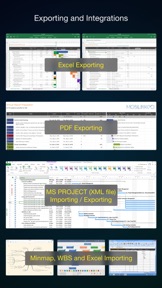
QuickPlan supports exporting projects to image, Excel, PDF, Microsoft Project and WBS files and importing projects from Microsoft Project (in XML format), WBS, Mindmap, and Excel files. Plans can be synchronized with multiple devices via iCloud Drive. They can be shared with other users and devices via AirDrop, email, and the iOS Files app.
QuickPlan optimizes the best features of Microsoft Project Plan and makes them work for iPhone - without the complexity. We bring INTUITIVE and discoverable project management to users of all experience levels.
## EFFICIENT MAINTENANCE
- Gestures for tasks: create, remove, move, indent and outdent, change order.
- Gestures to zoom in and out, collapse and expand.
- Dynamic context menu system makes scheduling a reality on a small touch screen
- Batch input
- The most fluid Gantt chart app on a clean interface.
- Context-based editing of outline, Gantt chart and inspectors.
## STRONG PLANNING
- Multiple projects in groups, with support for duplication.
- Organize tasks into REAL task groups and sub-projects.
- Task color, icon, contact, URLs, and other necessary task fields.
- Five outline levels (plus sub-project, for a total of ten outline levels).
. Gesture-based management of task links.
. Project currency, charge rate, project resource, calendar, task date policy.
## TREE and LIST
- Rendering as a tree with support for key path display.
- Rendering as a list with support for sorting and filtering.
## UI CUSTOMIZATION
- Customization of the task column title and visibility.
- Style of the task bar.
## REPORTING
- Export as image, PDF, and Microsoft Excel (including three sheets).
- With options to customize the output.
## SYNC
- Sync projects between iOS and Mac devices via iCloud Drive, OneDrive, and Dropbox.
## INTEGRATION
- Export and import Microsoft Project XML files.
- Import and export SwiftApp WBS files.
- Import from Microsoft Excel files.
- Import from iThought Map files.
## SHARE
- Supports Airdrop, OneDrive, Dropbox.
## TEAM
- Supports creating a sub-plan for specific project members.
- The sub-plan contains only the tasks for the specific members.
## NOTIFICATION
- Widget to track ongoing tasks (iOS 14 or later).
- Today widget and Local Notification.
QuickPlan simplifies the complexity of project planning that sets ease as the ultimate goal in organizing your professional projects, plans, efforts, goals and life. The best project planning app for iPhone
- Initialize, discuss, present and share your plan, and export it to Microsoft Project Plan for future work.
- Strategic Planning
- Import MS Project file (in XML format) and reports, tracking.
- Plan new ideas
- Agree and confirm actions in meetings
- Discuss, plan and assign tasks
- Track project progress

Что нового в версии 17.0

We are always looking for ways to make QuickPlan more powerful and easy to use for your project planning, management and execution. In this version, we have made a major enhancement that we think you will love:
- We have upgraded the baseline feature to archive the task work and costs fields in addition to the date and duration fields. Now you can compare the date, duration, work and costs fields between the actual and the archived data. This will allow you to measure the variance and performance of your project in more detail.
We hope you enjoy this enhancement and find it useful for your project management.

Продавец

Название

皓 李

Информация

Разработчик

Категории

Версия

17.0

Размер

91,7 MB

Game Center

Нет

VPP Device Licensing

Да

Рейтинг

Ограничение: 4+

Совместимость

iOS 12.2 или позже

Устройства

iPhone 5s, iPhone 6, iPhone 6 Plus, iPhone 6s, iPhone 6s Plus, iPhone SE, iPhone 7, iPhone 7 Plus, iPhone 8, iPhone 8 Plus, iPhone X, iPhone XR, iPhone XS, iPhone XS Max, iPhone 11, iPhone 11 Pro, iPhone 11 Pro Max, iPhone SE (2-го поколения), iPhone 12, iPhone 12 Pro, iPhone 12 Pro Max, iPhone 12 mini, iPhone 13, iPhone 13 Pro, iPhone 13 Pro Max, iPhone 13 mini, iPhone SE (3-го поколения), iPhone 14, iPhone 14 Plus, iPhone 14 Pro, iPhone 14 Pro Max, iPhone 15, iPhone 15 Plus, iPhone 15 Pro, iPhone 15 Pro Max, iPhone 16, iPhone 16 Plus, iPhone 16 Pro, iPhone 16 Pro Max, iPhone 16e, iPhone 17, iPhone 17Pro, iPhone 17ProMax, iPhone Air, iPad (5-го поколения) Wi-Fi, iPad (5-го поколения) Wi-Fi + Cellular, iPad (6-го поколения) Wi-Fi, iPad (6-го поколения) Wi-Fi + Cellular, iPad Pro, iPad Pro (Cellular), iPad Pro (9,7-дюймовый), iPad Pro (9,7-дюймовый) (Cellular), iPad Pro (12,9 дюйма, 2-го поколения), iPad Pro (12,9 дюйма, 2-го поколения) Wi-Fi + Cellular, iPad Pro (10,5 дюйма), iPad Pro (10,5 дюйма) Wi-Fi + Cellular., iPad Pro (11 дюйма), iPad Pro (11 дюйма) Wi-Fi + Cellular., iPad Pro (12,9 дюйма, 3-го поколения), iPad Pro (12,9 дюйма, 3-го поколения) Wi-Fi + Cellular, iPad Air, iPad Air (Cellular), iPad Air 2, iPad Air 2 (Cellular), iPad Air (3-го поколения), iPad Air (3-го поколения) Wi-Fi + Cellular, iPad mini Retina, iPad mini Retina (Cellular), iPad mini 3, iPad mini 3 (Cellular), iPad mini 4, iPad mini 4 (Cellular), iPad mini (5-го поколения), iPad mini (5-го поколения) Wi-Fi + Cellular, iPad (7-го поколения) Wi-Fi + Cellular, iPad Pro (11 дюймов, 2-го поколения), iPad Pro (11 дюймов, 2-го поколения) (Wi-Fi + Cellular), iPad Pro (12,9 дюйма, 4-го поколения), iPad Pro (12,9 дюйма, 4-го поколения) (Wi-Fi + Cellular), iPad Air (4-го поколения) (Wi-Fi), iPad Air (4-го поколения) (Wi-Fi + Cellular), iPad (8-го поколения) Wi-Fi, iPad (8-го поколения) Wi-Fi + Cellular, iPad Pro (11 дюймов, 3-го поколения), iPad Pro (11 дюймов, 3-го поколения) (Wi-Fi + Cellular), iPad Pro (12,9 дюйма, 5-го поколения), iPad Pro (12,9 дюйма, 5-го поколения) (Wi-Fi + Cellular), iPad (9-го поколения), iPad (9-го поколения) Wi-Fi + Cellular, iPad mini (6-го поколения), iPad mini (6-го поколения) Wi-Fi + Cellular, iPad Air (5-го поколения), iPad Air (5-го поколения) Wi-Fi + Cellular, iPad Pro (11 дюймов, 4-го поколения), iPad Pro (11 дюймов, 4-го поколения) (Wi-Fi + Cellular), iPad Pro (12,9 дюймов, 6-го поколения), iPad Pro (12,9 дюймов, 6-го поколения) (Wi-Fi + Cellular), iPad (10-го поколения), iPad (10-го поколения) (Wi-Fi + Cellular), iPad Air (11 дюймов, M2, Wi-Fi), iPad Air (13 дюймов, M2, Wi-Fi), iPad Air (13 дюймов, M2, Wi-Fi + Cellular), iPad Pro (11 дюймов, M4, Wi-Fi), iPad Pro (11 дюймов, M4, Wi-Fi + Cellular), iPad Pro (13 дюймов, M4, Wi-Fi), iPad Pro (13 дюймов, M4, Wi-Fi + Cellular), iPad mini (A17 Pro) Wi-Fi, iPad mini (A17 Pro) Wi-Fi + Cellular, iPad (A16) Wi-Fi, iPad (A16) Wi-Fi + Cellular, iPad Air 11-inch (M3) Wi-Fi, iPad Air 11-inch (M3) Wi-Fi + Cellular, iPad Air 13-inch (M3) Wi-Fi, iPad Air 13-inch (M3) Wi-Fi + Cellular, iPod touch (6-го поколения), iPod touch (7-го поколения)

Языки

App Store: Оценки покупателей

Оценки и отзывы

3,4 из 5 (5 Оценки)

App Store: Отзывы покупателей

2020-05-25

Important. !

1) A very important and convenient side is integration with the Calendar. Ideally, when the program itself automatically (after a command) integrates all the key dates into the Calendar (for example, this function can be assigned to Rhombus). That is, all positions in the program that are assigned a rhombus or square symbol are automatically transferred to the Calendar (after one click on the instruction to integrate into the Calendar.
2) When integrating into the Calendar, an important point is the correctness of filling in the fields in the Calendar itself. There are many Calendars in the calendar and many events from them. Calendar integration form (automatically). The name of the Event is registered (for example, a rally). In a new line (below) the name of the Project is registered. In the new stock (below), the Name of the parent program (Fine print, gray) is written. Convenience - minimal human involvement. Thank.
KNN OM
Версия 11.0
2020-02-20

Проблема

Удобно и понятно. Но проблема в том, что приложение самостоятельно сдвигает даты событий. Это подстава!
ьфч
Версия 3.1
2019-01-30

Последнее время зависания

В последнее время приложение зависает после нескольких минут использования не сохраняя последние изменения. Очень не удобно. Прошу срочно исправить.
Bushroman
Версия 6.0.1
2016-10-02

Нет синхронизации между устройствами

Купил я два приложения на айпад и на айфон. Думал что приложения будут синхронизировать проекты между собой. Однако это не так. Все делается вручную. А в целом приложение выполняет мои задачи. Но за синхронизацию такую я бы забанил приложение до устранения "бага"
Kamaldinov
Версия 10.1
2016-02-17

Nice

Very nice
XaocXX
Версия 7.0
2014-11-28

Красиво и функционально.

Красивые и удобные диаграммы, куча настроек, формулы подсчёта затрат на каждое действие в проекте, вплоть до расчёта зп по часам. диаграммы Гантта. Не удобно отсутствие русского языка в описаниях.
Felikis
Версия 2.0
2014-10-28

Жалоба

Здравствуйте!
Очень не доволен вашим приложением, так как при покупки написано что имеет русский язык и цена 66 руб. А купив нет русского языка и цена составила 169,13 руб. Прошу Вас разобраться и вернуть 103,13 руб. 😡
Furkat771
Версия 6.0.1
2014-09-12

Приложение отличное

Однако перестало работать на iOS 8
glebsam
Версия 8.0
2014-05-18

Нужная программа

Легко работать и планировать дела, выбранные задачи отправляет в календарь.
Блинвсепсевданимызаняты
2014-03-18

Сложно

Так и не разобралась. Слишком сложно сделано. Пользуюсь более удобными и понятными приложениями.
K___333
Версия 2.0