О компанииУсловияКонфиденциальностьКонтакт
 
Обновление
Valence 3D

Valence 3D

Выпуск: 2024-03-14
© 2025. Hi-Rez Inc. All rights reserved.
Valence 3D - QR Code
Версия 1.3.9
4+
Загрузите в App Store
Версия 1.3.9
4+
Загрузите в App Store
Выпуск: 2024-03-14
© 2025. Hi-Rez Inc. All rights reserved.

Снимки экрана iPhone

Скриншот
Скриншот
Скриншот
Скриншот
Скриншот
Скриншот
Скриншот
Скриншот
Скриншот
Скриншот

Снимки экрана iPad

Скриншот
Скриншот
Скриншот
Скриншот
Скриншот
Скриншот
Скриншот
Скриншот
Скриншот
Скриншот

Описание

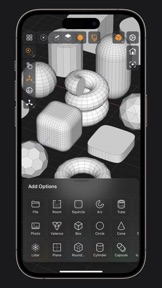
Valence 3D is a new powerful, beautiful & easy-to-use 3D modeler & design tool built from the ground up for iPad & iPhone. No matter whether you're learning 3D modeling for the first time or a professional working in design, construction, gaming, web dev, digital fabrication, architecture, or spatial computing, Valence 3D has what you need to get started!
CREATE, IMPORT, EDIT & EXPORT 3D MODELS
• 25 primitive shapes are built-in & ready to help you start modeling: plane, box, sphere, squircle, rounded box, arc, circle, cylinder, tube, cone, capsule, torus, icosphere, pipe, revolve, helix, voronoi, text, super shape, noise surfaces, torus knot, faceted gem & tube.
• Import existing models, reference images, lidar scans and room plans
• Imports: OBJ, STL, USD, USDZ
• Exports: PNG, SVG, OBJ, STL, USD, USDZ, GLTF, GLB
• Knife tool to create complex and detailed geometry
• Move, Rotate, & Scale gizmos make it easy to transform nodes, faces, edges & vertices
• Powerful modeling gizmos for extruding, insetting, beveling, poking, creasing & cutting
• Multiple selection & automatic loop selection help accelerate your modeling
• Tap on one of the gizmo handles to bring up an input field for precise transformations & mesh operations
• Robust snapping & alignment commands
• Selection operations: grow, shrink, select shell & deselect
• Mesh operations: duplicate, instance, set / center pivot, trim by plane, boolean, apply transform & subdivide
• Face operations: separate, combine, bridge, extract, poke, collapse, delete, dissolve, harden & soften
• Edge operations: extrude, insert vertex, collapse, dissolve, bridge, harden & soften
• Vertex operations: insert edge, dissolve, delete & merge
• Non-destructive & configurable mesh modifiers: mirror & subdivision
• Apply complex transformations using different gizmo pivot points & orientations
EASILY NAVIGATE & STAY IN FLOW WHILE DESIGNING
• Carefully crafted & fully optimized for iPhone & iPad
• Designed to minimize cognitive overload by only showing tools & commands that are contextually relevant
• Easily navigate to any part of your model by dragging and pinching: two finger pinch to zoom and roll, and one finger drag to rotate
• Pop into the standard orthographic views by tapping one of the handles of the orientation gizmo
• Use two & three finger tap gestures to undo & redo
• Select components by dragging or using the rectangular selection mode
• Your work is saved automatically every two minutes and every time you go back to the gallery
• Get an overview of your scene’s structure from the Outliner
• Long press on a node in the Outliner to easily rename, duplicate, instance, delete, parent & reorder any object in your scene
• Precisely adjust any node’s position, rotation & scale with the Inspector
• Adjust material properties, display & modifier options with the Inspector
STAY ORGANIZED ACROSS ALL YOUR DEVICES
• Preview, share, duplicate, delete & rename your models from the gallery
• iCloud syncing keeps all your models up to date, private & accessible across all your devices
PREVIEW, MEASURE, & RENDER YOUR CREATIONS
• 6 powerful rendering modes: Matcap, Modeling, Wireframe, Physically Based, X-Ray & Path Traced
• Export renders in any aspect ratio & scale
• Preview your model in AR in two taps
• Export your scene as a USDZ & be confident it’ll look consistent on all Apple devices
• Tweak your model’s material & see changes in real-time
• Tweak-able scene settings: camera field of view, background type, blurriness, intensity & rotation
• Get model measurements in one click
• Add persistent dimensions between any two surfaces in your scene
PURCHASE & COMPATIBILITY
• One time purchase unlocks both iPhone & iPad versions
• Apple Pencil supported on select iPads
• 120 FPS supported on devices with ProMotion displays
• Path Tracing is supported on iPads with M series chips & iPhones with A15 Bionic & later
• Lidar Scan & Room Plan is supported on devices with a lidar sensor

Что нового в версии 1.3.9

Minor bug fix.

Продавец

Название

Hi-Rez, Inc

Адрес страницы

Информация

Разработчик

Категории

Версия

1.3.9

Размер

203 MB

Game Center

Нет

VPP Device Licensing

Да

Рейтинг

Ограничение: 4+

Совместимость

iOS 18.0 или позже

Устройства

iPhone 5s, iPhone 6, iPhone 6 Plus, iPhone 6s, iPhone 6s Plus, iPhone SE, iPhone 7, iPhone 7 Plus, iPhone 8, iPhone 8 Plus, iPhone X, iPhone XR, iPhone XS, iPhone XS Max, iPhone 11, iPhone 11 Pro, iPhone 11 Pro Max, iPhone SE (2-го поколения), iPhone 12, iPhone 12 Pro, iPhone 12 Pro Max, iPhone 12 mini, iPhone 13, iPhone 13 Pro, iPhone 13 Pro Max, iPhone 13 mini, iPhone SE (3-го поколения), iPhone 14, iPhone 14 Plus, iPhone 14 Pro, iPhone 14 Pro Max, iPhone 15, iPhone 15 Plus, iPhone 15 Pro, iPhone 15 Pro Max, iPhone 16, iPhone 16 Plus, iPhone 16 Pro, iPhone 16 Pro Max, iPhone 16e, iPhone 17, iPhone 17 Pro, iPhone 17 Pro Max, iPhone Air, iPhone 17e, iPad (5-го поколения) Wi-Fi, iPad (5-го поколения) Wi-Fi + Cellular, iPad (6-го поколения) Wi-Fi, iPad (6-го поколения) Wi-Fi + Cellular, iPad Pro, iPad Pro (Cellular), iPad Pro (9,7-дюймовый), iPad Pro (9,7-дюймовый) (Cellular), iPad Pro (12,9 дюйма, 2-го поколения), iPad Pro (12,9 дюйма, 2-го поколения) Wi-Fi + Cellular, iPad Pro (10,5 дюйма), iPad Pro (10,5 дюйма) Wi-Fi + Cellular., iPad Pro (11 дюйма), iPad Pro (11 дюйма) Wi-Fi + Cellular., iPad Pro (12,9 дюйма, 3-го поколения), iPad Pro (12,9 дюйма, 3-го поколения) Wi-Fi + Cellular, iPad Air, iPad Air (Cellular), iPad Air 2, iPad Air 2 (Cellular), iPad Air (3-го поколения), iPad Air (3-го поколения) Wi-Fi + Cellular, iPad mini Retina, iPad mini Retina (Cellular), iPad mini 3, iPad mini 3 (Cellular), iPad mini 4, iPad mini 4 (Cellular), iPad mini (5-го поколения), iPad mini (5-го поколения) Wi-Fi + Cellular, iPad (7-го поколения) Wi-Fi + Cellular, iPad Pro (11 дюймов, 2-го поколения), iPad Pro (11 дюймов, 2-го поколения) (Wi-Fi + Cellular), iPad Pro (12,9 дюйма, 4-го поколения), iPad Pro (12,9 дюйма, 4-го поколения) (Wi-Fi + Cellular), iPad Air (4-го поколения) (Wi-Fi), iPad Air (4-го поколения) (Wi-Fi + Cellular), iPad (8-го поколения) Wi-Fi, iPad (8-го поколения) Wi-Fi + Cellular, iPad Pro (11 дюймов, 3-го поколения), iPad Pro (11 дюймов, 3-го поколения) (Wi-Fi + Cellular), iPad Pro (12,9 дюйма, 5-го поколения), iPad Pro (12,9 дюйма, 5-го поколения) (Wi-Fi + Cellular), iPad (9-го поколения), iPad (9-го поколения) Wi-Fi + Cellular, iPad mini (6-го поколения), iPad mini (6-го поколения) Wi-Fi + Cellular, iPad Air (5-го поколения), iPad Air (5-го поколения) Wi-Fi + Cellular, iPad Pro (11 дюймов, 4-го поколения), iPad Pro (11 дюймов, 4-го поколения) (Wi-Fi + Cellular), iPad Pro (12,9 дюймов, 6-го поколения), iPad Pro (12,9 дюймов, 6-го поколения) (Wi-Fi + Cellular), iPad (10-го поколения), iPad (10-го поколения) (Wi-Fi + Cellular), iPad Air (11 дюймов, M2, Wi-Fi), iPad Air (13 дюймов, M2, Wi-Fi), iPad Air (13 дюймов, M2, Wi-Fi + Cellular), iPad Pro (11 дюймов, M4, Wi-Fi), iPad Pro (11 дюймов, M4, Wi-Fi + Cellular), iPad Pro (13 дюймов, M4, Wi-Fi), iPad Pro (13 дюймов, M4, Wi-Fi + Cellular), iPad mini (A17 Pro) Wi-Fi, iPad mini (A17 Pro) Wi-Fi + Cellular, iPad (A16) Wi-Fi, iPad (A16) Wi-Fi + Cellular, iPad Air 11-inch (M3) Wi-Fi, iPad Air 11-inch (M3) Wi-Fi + Cellular, iPad Air 13-inch (M3) Wi-Fi, iPad Air 13-inch (M3) Wi-Fi + Cellular, iPad Pro (11 дюймов, M5, Wi-Fi), iPad Pro (11 дюймов, M5, Wi-Fi + Cellular), iPad Pro (13 дюймов, M5, Wi-Fi), iPad Pro (13 дюймов, M5, Wi-Fi + Cellular), iPad Air11M4, iPad Air11M4Cellular, iPad Air13M4, iPad Air13M4Cellular, iPod touch (6-го поколения), iPod touch (7-го поколения)

Языки

русский, английский, датский, испанский, итальянский, китайский, корейский, немецкий, португальский, французский, шведский, японский

App Store: Оценки покупателей

Оценки и отзывы

3,8 из 5 (18 Оценки)

App Store: Отзывы покупателей

2025-10-19

Бесполезный оверпрайс продукт

Категорически не советую покупать,единственное что здесь хорошо, это плавность и отзывчивость интерфейса.В остальном за 40 долларов получаешь огрызок с отвратительно работающей симметрией,которую без костылей нормально не получится использовать,и в целом очень базовый набор функций,которые будет достаточно только для создания кружек,все остальное будет делать очень больно.
Кокор
Версия 1.3.9
2025-03-24

Лучшая программа для 3Д

Она такая понятная и буквально на кончиках пальцев. Единственное, чего мне не хватает это импорт векторной графики в программу, чтобы выдавливать логотипы и иконки. Когда это добавится, мои задачи будут полностью решены! Большое вам спасибо!
art-yakovlev
2024-10-13

Супер!

Отличнейшая программулина! Крайне доволен, респект разработчикам!
Shmillller
Версия 1.0.7
2024-09-06

Well…

Change my rate to 1 stars. After about 6 months there are still no base(essential ) tools for modeling. Good luck at cups and mugs modeling.
Evilartist
Версия 1.1.3
2024-05-26

Nice app!

Nice app!
di.klenz
Версия 1.1.0
2024-05-19

претензия

Почему у меня поменялся интерфейс""""" Куда делась команда трансформации?( №)IMG_2685.JPG
старшина123
Версия 1.0.6
2024-05-13

Лучшее на iPad, но очень сыро.

1) Что с выделением? Выделяет что угодно, но не нужное ребро, особенно на открытом - незамкнутом меше. Сделайте нормальную настройку - выделение только карандашом, а навигацию только пальцами) Чтобы выделяло не мимо на открытом меше 2) Нужен multi cut как в Maya - здесь ножа вообще нет. Нужно добавить все что ниже - на данном этапе базовый функционал не реализован 3) Bridge multiple edge and edge loops? 4) Deformers? 5) Boolean? 6) Snapping to object and conform? 7)Fillet? 8)Slide И еще 100/500 нюансов на доработку
AlexArza!
Версия 1.0.8
2024-05-03

Я ждал

Все норм. Ничего не вылетает, но есть несколько но.
1 это Bevel. Если его так можно называть.
2 выбор граней и точек не всегда удобный.
3 нет Boolean operations?
4 так и не понял как сделать bridge между зацыклиными faces
Ждем обновлений.
Я уверен ты справишься с задачей.
LokiAngel1987
Версия 1.2.4
2024-05-02

Maybe it will help someone

The application was launched for the first time, then it either hung or crashed during repeated launches, I tried to disable icloud - it did not help, now I have completely deleted the application, and then installed it again, now the application runs stably.
WerewolF791
Версия 1.3.5
2024-04-28

Not working. Waste of money.

Launched ones fine, but after that it just crashing on loading. iPad Pro.
SquareBunnyBoy
Версия 1.1.2
2024-04-18

Верните деньги

Пожалуйста верните деньги!
Приложение после первого запуска зависает и не работает! Экспорт приводит к зависанию приложения и оно больше не запускается! Такое вижу впервые в Apple Store! Ни в коем случае не покупайте его!
Sskinless
2024-04-12

App is broken

First time it starts normally on my iPhone 15 pro max an on my iPad Pro M2 but after 10 minutes it just freeze up…after restart it give me blank grey screen with orange plus button in bottom right corner, if I press it - app just freeze again. Reinstall don’t helped.
pifag0r