О компанииУсловияКонфиденциальностьКонтакт
 
Обновление
3Dskope

3Dskope

Выпуск: 2012-04-01
© Seselmo UG (haftungsbeschränkt)
3Dskope - QR Code
Версия 1.2.3
9+
Загрузите в App Store
Версия 1.2.3
9+
Загрузите в App Store
Выпуск: 2012-04-01
© Seselmo UG (haftungsbeschränkt)

Снимки экрана iPhone

Скриншот
Скриншот
Скриншот
Скриншот
Скриншот
Скриншот
Скриншот
Скриншот
Скриншот
Скриншот

Снимки экрана iPad

Скриншот
Скриншот
Скриншот
Скриншот
Скриншот
Скриншот
Скриншот
Скриншот
Скриншот
Скриншот

Описание

Browse GZ, RAR and ZIP archives and view 3D content from a variety of popular data formats right on your iPhone, iPad or iPod Touch. View 3D data attached to E-mail messages, download from websites or online cloud storage or transfer via iTunes document exchange or from the Files app.
3Dskope natively supports 3DS, ASE, OBJ, PLY, and STL formats. Additional data formats are available via 3Dskope Importer extensions (see below).
3Dskope also handles some bitmap formats not supported by iOS (e.g. DDS, TIFF, TGA). Other document types (AR content, PDF's, photos, movies, office doc's, etc...) are passed to iOS for preview generation.
Thus, 3Dskope is an advanced, high quality 3D viewer with additional general-purpose content viewing capabilities.
3Dskope lets you play animations embedded in 3DS or ASE files (mono- or stereoscopic), lets you toggle light sources and gives you an overview of the elements that comprise the scene (cameras, lights, materials, meshes, groups).
In addition to polygonal mesh geometry 3Dskope can import NURBS curves and surfaces from OBJ files.
Using 3Dskope's Magic Crosshair™ you can measure coordinates, distances, areas and volumes. In addition you can use the clip tool to display and animate cross-sectional views.
You can customize the UI for left-hand or right-hand operation. Also, you can select from a number of background patterns, gradients and color schemes or define your own look.
Additional capabilities are available via In-App Purchase extensions:
- 3Dskope Professional lets you load scene textures, provides extended visualization modes, and lets you render your scene in high resolution with transparent background. On supported devices an additional spatial image is generated when rendering in side-by-side stereo mode.
- 3Dskope Explorer provides a new and intuitive way to view the properties of your scene’s cameras, lights, materials, nodes, animation tracks and animation keys. In addition you can explore individual meshes in a separate 3D view.
- 3Dskope Exporter lets you save your scene to various popular data formats (3DS, OBJ/MTL, PLY, and STL are currently available). Free trial exporters are included for evaluation. These have full functionality but the trial exporter's output can only be opened with 3Dskope and only on the same device. This way you can test the exporter before buying the unrestricted version via In-App purchase.
- 3Dskope Importer provides support for additional data formats. Static preview generation is available for free. Again, this lets you test before you buy the full functionality for a specific data format via In-App purchase. AC3D is the first additional data format provided by a 3Dskope Importer extension.
For a detailed app description view the 3Dskope Quick Start Guide on our website. There are also some short tutorial videos on YouTube. Just search for "3Dskope".
Please contact Seselmo Support if you have questions about 3Dskope or if you want to leave feedback. Also, please take a few moments to write an app review for 3Dskope.
ACKNOWLEDGEMENTS:
3D datasets used in screenshots:
- Camera: booka80 via cgtrader.com
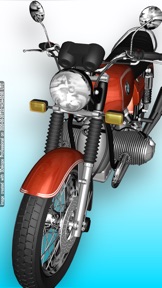
- Motorbike (included): gonzo-3d.com
- Turbine Blade: cc.gatech.edu/projects/large_models
- Kap Hornier and Seahorse: deespona.com
- NURBS iPhone 5c (included): Andreas S. Gkertsos
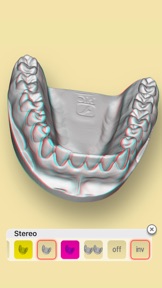
- Dental Mould: scan sample by 3d3solutions.com
- Turbo Sonic (included): squir.com
3Dskope Professional was used to create some of the screenshots.
Unless otherwise noted 3D datasets are NOT included with the app. With your download of the 3Dskope app you do NOT obtain any rights to included 3D datasets other than the right to display those datasets within the 3Dskope app. Any included 3D datasets may be removed from future versions of the app without compensation.

Что нового в версии 1.2.3

- corrections and refinements
- support for dark mode
new in 3Dskope Professional:
- saves a spatial image to the camera roll when performing "Render Scene" while in side-by-side stereo mode. appropriate device capabilities are required.

Продавец

Название

Seselmo UG (haftungsbeschrankt)

Адрес страницы

Информация

Разработчик

Категории

Версия

1.2.3

Размер

61,4 MB

Game Center

Нет

VPP Device Licensing

Да

Рейтинг

Ограничение: 9+

Совместимость

iOS 16.6 или позже

Устройства

iPhone 5s, iPhone 6, iPhone 6 Plus, iPhone 6s, iPhone 6s Plus, iPhone SE, iPhone 7, iPhone 7 Plus, iPhone 8, iPhone 8 Plus, iPhone X, iPhone XR, iPhone XS, iPhone XS Max, iPhone 11, iPhone 11 Pro, iPhone 11 Pro Max, iPhone SE (2-го поколения), iPhone 12, iPhone 12 Pro, iPhone 12 Pro Max, iPhone 12 mini, iPhone 13, iPhone 13 Pro, iPhone 13 Pro Max, iPhone 13 mini, iPhone SE (3-го поколения), iPhone 14, iPhone 14 Plus, iPhone 14 Pro, iPhone 14 Pro Max, iPhone 15, iPhone 15 Plus, iPhone 15 Pro, iPhone 15 Pro Max, iPhone 16, iPhone 16 Plus, iPhone 16 Pro, iPhone 16 Pro Max, iPhone 16e, iPhone 17, iPhone 17 Pro, iPhone 17 Pro Max, iPhone Air, iPad (5-го поколения) Wi-Fi, iPad (5-го поколения) Wi-Fi + Cellular, iPad (6-го поколения) Wi-Fi, iPad (6-го поколения) Wi-Fi + Cellular, iPad Pro, iPad Pro (Cellular), iPad Pro (9,7-дюймовый), iPad Pro (9,7-дюймовый) (Cellular), iPad Pro (12,9 дюйма, 2-го поколения), iPad Pro (12,9 дюйма, 2-го поколения) Wi-Fi + Cellular, iPad Pro (10,5 дюйма), iPad Pro (10,5 дюйма) Wi-Fi + Cellular., iPad Pro (11 дюйма), iPad Pro (11 дюйма) Wi-Fi + Cellular., iPad Pro (12,9 дюйма, 3-го поколения), iPad Pro (12,9 дюйма, 3-го поколения) Wi-Fi + Cellular, iPad Air, iPad Air (Cellular), iPad Air 2, iPad Air 2 (Cellular), iPad Air (3-го поколения), iPad Air (3-го поколения) Wi-Fi + Cellular, iPad mini Retina, iPad mini Retina (Cellular), iPad mini 3, iPad mini 3 (Cellular), iPad mini 4, iPad mini 4 (Cellular), iPad mini (5-го поколения), iPad mini (5-го поколения) Wi-Fi + Cellular, iPad (7-го поколения) Wi-Fi + Cellular, iPad Pro (11 дюймов, 2-го поколения), iPad Pro (11 дюймов, 2-го поколения) (Wi-Fi + Cellular), iPad Pro (12,9 дюйма, 4-го поколения), iPad Pro (12,9 дюйма, 4-го поколения) (Wi-Fi + Cellular), iPad Air (4-го поколения) (Wi-Fi), iPad Air (4-го поколения) (Wi-Fi + Cellular), iPad (8-го поколения) Wi-Fi, iPad (8-го поколения) Wi-Fi + Cellular, iPad Pro (11 дюймов, 3-го поколения), iPad Pro (11 дюймов, 3-го поколения) (Wi-Fi + Cellular), iPad Pro (12,9 дюйма, 5-го поколения), iPad Pro (12,9 дюйма, 5-го поколения) (Wi-Fi + Cellular), iPad (9-го поколения), iPad (9-го поколения) Wi-Fi + Cellular, iPad mini (6-го поколения), iPad mini (6-го поколения) Wi-Fi + Cellular, iPad Air (5-го поколения), iPad Air (5-го поколения) Wi-Fi + Cellular, iPad Pro (11 дюймов, 4-го поколения), iPad Pro (11 дюймов, 4-го поколения) (Wi-Fi + Cellular), iPad Pro (12,9 дюймов, 6-го поколения), iPad Pro (12,9 дюймов, 6-го поколения) (Wi-Fi + Cellular), iPad (10-го поколения), iPad (10-го поколения) (Wi-Fi + Cellular), iPad Air (11 дюймов, M2, Wi-Fi), iPad Air (13 дюймов, M2, Wi-Fi), iPad Air (13 дюймов, M2, Wi-Fi + Cellular), iPad Pro (11 дюймов, M4, Wi-Fi), iPad Pro (11 дюймов, M4, Wi-Fi + Cellular), iPad Pro (13 дюймов, M4, Wi-Fi), iPad Pro (13 дюймов, M4, Wi-Fi + Cellular), iPad mini (A17 Pro) Wi-Fi, iPad mini (A17 Pro) Wi-Fi + Cellular, iPad (A16) Wi-Fi, iPad (A16) Wi-Fi + Cellular, iPad Air 11-inch (M3) Wi-Fi, iPad Air 11-inch (M3) Wi-Fi + Cellular, iPad Air 13-inch (M3) Wi-Fi, iPad Air 13-inch (M3) Wi-Fi + Cellular, iPad Pro (11 дюймов, M5, Wi-Fi), iPad Pro (11 дюймов, M5, Wi-Fi + Cellular), iPad Pro (13 дюймов, M5, Wi-Fi), iPad Pro (13 дюймов, M5, Wi-Fi + Cellular), iPod touch (6-го поколения), iPod touch (7-го поколения)

Языки

английский

App Store: Оценки покупателей

Оценки и отзывы

3,5 из 5 (6 Оценки)

App Store: Отзывы покупателей

2019-11-19

Интерфейс нерабочий

За 5 мин так и не понял, как открыть сохраненную модель. Приложение либо не продуманное, либо нерабочее.
pm_chetttt
Версия 1.1.7
2016-03-14

Для меня,все супер!

Закачал эту прогу для того чтоб в айфоне просматривать (сделанные в архикаде) архитектурные 3D модели зданий и т.п.
Очень все понравилось.Кручу себе теперь и просматриваю.Очень удобно и для других.
IzdeVajkin
Версия 1.1.7