О компанииУсловияКонфиденциальностьКонтакт
 
Обновление
El Trackpad

El Trackpad

Выпуск: 2020-10-02
© 2020-2021 Hugo Lispector
El Trackpad - QR Code
Версия 1.0.8
4+
Загрузите в App Store
Версия 1.0.8
4+
Загрузите в App Store
Выпуск: 2020-10-02
© 2020-2021 Hugo Lispector

Снимки экрана iPhone

Скриншот
Скриншот
Скриншот
Скриншот
Скриншот
Скриншот
Скриншот
Скриншот
Скриншот
Скриншот

Описание

Transform your iPhone or iPad into a fully featured Mac trackpad with gestures support.
This app was written by a single person and was featured by 9to5Mac, Redmond Pie, AppAdvice, MacMagazine and more.
REVIEWS
“I’ve tried many similar apps before, but none of them worked as well as El Trackpad. Besides not having any notable lag, the app lets the user perform the same gestures as you can do on Apple’s Magic Trackpad.”
— 9to5Mac
“What makes El Trackpad so impressive here is the fact that it appears to be lag-free and works identically to an actual Apple Magic Trackpad, which is super awesome.”
— Redmond Pie
“If you’ve ever used a Magic Trackpad or the built-in version on any MacBook model, you’ll be right at home with the app.”
— AppAdvice
“This app transforms the iPhone/iPad into a complete trackpad for Macs, with multi-touch support and everything.”
— MacMagazine
DESCRIPTION
Move the mouse cursor with the slide of a finger and smoothly navigate through your content with inertial scrolling. Pinch to zoom, rotate with your fingers and much more. Control your Mac in real-time with no lag.
El Trackpad works like magic and has the features and touch gestures that you expect from a touchpad for a Mac computer.
GET STARTED
- Download and Install El trackpad on your iOS/iPadOS device and on your Mac.
- Enable accessibility features on the Mac app when prompted. This is required to control the mouse cursor.
- Connect the devices via USB cable.
SUPPORTED GESTURES
- Tap to click: Tap with one finger to click
- Secondary click: Tap with two fingers to right click
- Smart zoom: Double-tap with two fingers to zoom in and out
- Scroll: Slide two fingers to scroll
- Zoom: Pinch with two fingers to zoom
- Rotate: Move two fingers around each other to rotate
- Three-finger drag: Use three fingers to drag items on the screen
- Look up: Tap with three fingers to look up a word
- Show desktop: Spread your thumb and four fingers to show the desktop
- Launchpad: Pinch with your whole hand to show Launchpad
- Mission Control: Swipe up with four fingers to open mission control
- App Exposé: Swipe down with four fingers to open App Exposé
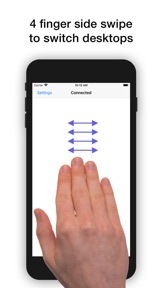
- Swipe between desktops: Swipe left or right with four fingers to move between full-screen apps or desktops
ADDITIONAL INFO
El Trackpad can be downloaded for free and offers a 7-day free trial with full functionality. After that, gestures with 2 fingers or more will no longer be recognized. At any time, you may unlock the app forever with a one-time in-app purchase.

Что нового в версии 1.0.8

- Fixed direction of swipe between desktops gesture when natural scroll direction is turned off.
- Fixed a bug that could cause the app to present an incorrect error message when an in-app purchase failed.

Продавец

Название

Hugo Lispector

Адрес страницы

Информация

Разработчик

Категории

Версия

1.0.8

Размер

15,4 MB

Game Center

Нет

VPP Device Licensing

Да

Рейтинг

Ограничение: 4+

Совместимость

iOS 10.0 или позже

Устройства

iPhone 5, iPhone 5c, iPhone 5s, iPhone 6, iPhone 6 Plus, iPhone 6s, iPhone 6s Plus, iPhone SE, iPhone 7, iPhone 7 Plus, iPhone 8, iPhone 8 Plus, iPhone X, iPhone XR, iPhone XS, iPhone XS Max, iPhone 11, iPhone 11 Pro, iPhone 11 Pro Max, iPhone SE (2-го поколения), iPhone 12, iPhone 12 Pro, iPhone 12 Pro Max, iPhone 12 mini, iPhone 13, iPhone 13 Pro, iPhone 13 Pro Max, iPhone 13 mini, iPhone SE (3-го поколения), iPhone 14, iPhone 14 Plus, iPhone 14 Pro, iPhone 14 Pro Max, iPhone 15, iPhone 15 Plus, iPhone 15 Pro, iPhone 15 Pro Max, iPad (4-го поколения) (Wi-Fi), iPad (4-го поколения) (4G), iPad (5-го поколения) Wi-Fi, iPad (5-го поколения) Wi-Fi + Cellular, iPad (6-го поколения) Wi-Fi, iPad (6-го поколения) Wi-Fi + Cellular, iPad Pro, iPad Pro (Cellular), iPad Pro (9,7-дюймовый), iPad Pro (9,7-дюймовый) (Cellular), iPad Pro (12,9 дюйма, 2-го поколения), iPad Pro (12,9 дюйма, 2-го поколения) Wi-Fi + Cellular, iPad Pro (10,5 дюйма), iPad Pro (10,5 дюйма) Wi-Fi + Cellular., iPad Pro (11 дюйма), iPad Pro (11 дюйма) Wi-Fi + Cellular., iPad Pro (12,9 дюйма, 3-го поколения), iPad Pro (12,9 дюйма, 3-го поколения) Wi-Fi + Cellular, iPad Air, iPad Air (Cellular), iPad Air 2, iPad Air 2 (Cellular), iPad Air (3-го поколения), iPad Air (3-го поколения) Wi-Fi + Cellular, iPad mini Retina, iPad mini Retina (Cellular), iPad mini 3, iPad mini 3 (Cellular), iPad mini 4, iPad mini 4 (Cellular), iPad mini (5-го поколения), iPad mini (5-го поколения) Wi-Fi + Cellular, iPad (7-го поколения) Wi-Fi + Cellular, iPad Pro (11 дюймов, 2-го поколения), iPad Pro (11 дюймов, 2-го поколения) (Wi-Fi + Cellular), iPad Pro (12,9 дюйма, 4-го поколения), iPad Pro (12,9 дюйма, 4-го поколения) (Wi-Fi + Cellular), iPad Air (4-го поколения) (Wi-Fi), iPad Air (4-го поколения) (Wi-Fi + Cellular), iPad (8-го поколения) Wi-Fi, iPad (8-го поколения) Wi-Fi + Cellular, iPad Pro (11 дюймов, 3-го поколения), iPad Pro (11 дюймов, 3-го поколения) (Wi-Fi + Cellular), iPad Pro (12,9 дюйма, 5-го поколения), iPad Pro (12,9 дюйма, 5-го поколения) (Wi-Fi + Cellular), iPad (9-го поколения), iPad (9-го поколения) Wi-Fi + Cellular, iPad mini (6-го поколения), iPad mini (6-го поколения) Wi-Fi + Cellular, iPad Air (5-го поколения), iPad Air (5-го поколения) Wi-Fi + Cellular, iPad Pro (11 дюймов, 4-го поколения), iPad Pro (11 дюймов, 4-го поколения) (Wi-Fi + Cellular), iPad Pro (12,9 дюймов, 6-го поколения), iPad Pro (12,9 дюймов, 6-го поколения) (Wi-Fi + Cellular), iPad (10-го поколения), iPad (10-го поколения) (Wi-Fi + Cellular), iPod touch (6-го поколения), iPod touch (7-го поколения)

Языки

английский

App Store: Оценки покупателей

Оценки и отзывы

3,1 из 5 (11 Оценки)

App Store: Отзывы покупателей

2022-02-02

Требуется доработка!

Использовать кабель? Серьезно? Сейчас будут следующие модели телефонов без гнёзд и что тогда? Быстрее отказывайтесь от кабелей и переходите на Bluetooth или Wi-Fi!
Bzic31
Версия 1.0.8
2021-04-27

Cable & subscription management

The app is great but the fact that it only works with the cable really doesn’t let me to give it 5 stars. Plus I don’t really get how can I check my subscription status as it the app doesn’t appear in my subscription list.
Alice__96
Версия 1.0.7
2021-02-26

Нет заявленного функционала

Поведение мыши в приложении не повторяет заявленного в нем функционала Magic Trackpad. Полурабочая поделка школьника
arozhankov
Версия 1.0.7
2021-02-21

Why only the usb connection?

This is the best trackpad! But add a wi-fi or bluetooth connection and then there will be 5
Andrewzhkov
Версия 1.0.7
2021-01-22

Работает только при подключении кабелем

Отличное приложение. Жесты, отзывчивость курса все на 5+. Но увы только при подключении кабелем к компьютеру. Добавьте беспроводное подключение - куплю не задумываясь ))
Mike Bubo
Версия 1.0.7
2020-10-07

Вопрос о способе отмены платежей

please tell me how to unsubscribe from
Александр 75
Версия 1.0.2
2020-10-06

Need for PC

It's a great idea! But do you plan to make a windows version ?
MoreFixLive
Версия 1.0.2