О компанииУсловияКонфиденциальностьКонтакт
 
Обновление
Klipsch Connect

Klipsch Connect

Выпуск: 2020-03-06
© 2020-2023 Klipsch Group, Inc.
Klipsch Connect - QR Code
Версия 1.20.0
4+
Загрузите в App Store
Версия 1.20.0
4+
Загрузите в App Store
Выпуск: 2020-03-06
© 2020-2023 Klipsch Group, Inc.

Снимки экрана iPhone

Скриншот
Скриншот
Скриншот
Скриншот
Скриншот
Скриншот
Скриншот

Снимки экрана iPad

Скриншот
Скриншот
Скриншот
Скриншот
Скриншот

Описание

Need support or have a feature suggestion? Please reach out to our Product Support team:
• Live Chat in the App or
• https://support.klipsch.com or
• +1-800-KLIPSCH
Klipsch Connect™ works with:
• The One Plus and The Three Plus tabletop speakers
• The Fives, The Sevens, The Nines, and The Nines McLaren powered monitors
• Cinema 700, 800 and 1200 Series soundbars
• Cinema 600 Series soundbar
• T5 Series True Wireless earphones
• T5 II series True Wireless earphones
• T5 II ANC series True Wireless earphones
You can easily personalize your experience by adjusting EQ, transparency, and ANC settings. Soundbar and Powered Monitor products all support Virtual Remote Control. You can install feature updates, troubleshoot common issues, contact product support - including in-app Live Chat, and much more.
Features (availability varies by product):
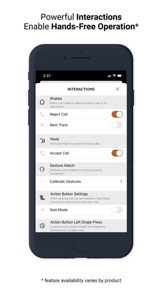
• Virtual Remote Control
• EQ Presets
• Custom EQ Adjustments
• ANC Level Control
• Transparency Mode & Level
• Dirac HD Sound
• Dynamic Bass Control - a.k.a. "Loudness"
• Room Placement Control - a.k.a. "Bass Cut Mode"
• Dolby Atmos (tm) Sound Mode Control
• Night Mode and Dialog Mode Control
• Channel-Specific Volume Control
• Subwoofer Volume Control
• Bragi AI, Moves & Sidekicks
• Battery Level & Status
• Live Chat with Support (during business hours)
• Quick-Start Guides & Product Manuals
• How-To Videos and FAQs
• Product Firmware and Feature Updates
• Product Registration
• Easy Access to Product Support
IMPORTANT FIVES UPDATE: If you cannot connect after you run the Fives Updater app, that means Step 1 did not complete successfully. Make sure to run the USB update. If you need help, we're here for you - please reach out to Product Support (link below) and we'll help you complete the update.
How to Access Cinema Soundbar and Fives, Sevens, and Nines Virtual Remote Capabilities:
Cinema 1200, 800, and 700
Virtual Remote Control and EQ features require the soundbar be running the latest update. This normally happens automatically when the soundbar has been connected to the Internet, either via Klipsch Connect or Google Home. If your device has not been connected to the Internet, please contact our Product Support Team for assistance. See details below.
The Fives, The Sevens, and The Nines, including McLaren Editions
Virtual Remote Control and EQ features require the powered monitors be running the latest update. If you have not updated your Fives already, please download the free "Klipsch The Fives Updater" app. This will walk you through the update process. After the update is complete, all future updates will come through Klipsch Connect. Our Product Support team can walk you through the entire process. Simply reach out to us at:
• Live Chat in the App! or
• https://support.klipsch.com or
• +1-800-KLIPSCH

Что нового в версии 1.20.0

• Added support for Music City products
• Visual improvements
• Tweaks and bug fixes based on customer feedback

Продавец

Название

Klipsch Group, Inc.

Адрес страницы

Информация

Разработчик

Категории

Версия

1.20.0

Размер

267,2 MB

Game Center

Нет

VPP Device Licensing

Да

Рейтинг

Ограничение: 4+

Совместимость

iOS 12.4 или позже

Устройства

iPhone 5s, iPhone 6, iPhone 6 Plus, iPhone 6s, iPhone 6s Plus, iPhone SE, iPhone 7, iPhone 7 Plus, iPhone 8, iPhone 8 Plus, iPhone X, iPhone XR, iPhone XS, iPhone XS Max, iPhone 11, iPhone 11 Pro, iPhone 11 Pro Max, iPhone SE (2-го поколения), iPhone 12, iPhone 12 Pro, iPhone 12 Pro Max, iPhone 12 mini, iPhone 13, iPhone 13 Pro, iPhone 13 Pro Max, iPhone 13 mini, iPhone SE (3-го поколения), iPhone 14, iPhone 14 Plus, iPhone 14 Pro, iPhone 14 Pro Max, iPhone 15, iPhone 15 Plus, iPhone 15 Pro, iPhone 15 Pro Max, iPhone 16, iPhone 16Plus, iPhone 16Pro, iPhone 16ProMax, iPhone 16e, iPad (5-го поколения) Wi-Fi, iPad (5-го поколения) Wi-Fi + Cellular, iPad (6-го поколения) Wi-Fi, iPad (6-го поколения) Wi-Fi + Cellular, iPad Pro, iPad Pro (Cellular), iPad Pro (9,7-дюймовый), iPad Pro (9,7-дюймовый) (Cellular), iPad Pro (12,9 дюйма, 2-го поколения), iPad Pro (12,9 дюйма, 2-го поколения) Wi-Fi + Cellular, iPad Pro (10,5 дюйма), iPad Pro (10,5 дюйма) Wi-Fi + Cellular., iPad Pro (11 дюйма), iPad Pro (11 дюйма) Wi-Fi + Cellular., iPad Pro (12,9 дюйма, 3-го поколения), iPad Pro (12,9 дюйма, 3-го поколения) Wi-Fi + Cellular, iPad Air, iPad Air (Cellular), iPad Air 2, iPad Air 2 (Cellular), iPad Air (3-го поколения), iPad Air (3-го поколения) Wi-Fi + Cellular, iPad mini Retina, iPad mini Retina (Cellular), iPad mini 3, iPad mini 3 (Cellular), iPad mini 4, iPad mini 4 (Cellular), iPad mini (5-го поколения), iPad mini (5-го поколения) Wi-Fi + Cellular, iPad (7-го поколения) Wi-Fi + Cellular, iPad Pro (11 дюймов, 2-го поколения), iPad Pro (11 дюймов, 2-го поколения) (Wi-Fi + Cellular), iPad Pro (12,9 дюйма, 4-го поколения), iPad Pro (12,9 дюйма, 4-го поколения) (Wi-Fi + Cellular), iPad Air (4-го поколения) (Wi-Fi), iPad Air (4-го поколения) (Wi-Fi + Cellular), iPad (8-го поколения) Wi-Fi, iPad (8-го поколения) Wi-Fi + Cellular, iPad Pro (11 дюймов, 3-го поколения), iPad Pro (11 дюймов, 3-го поколения) (Wi-Fi + Cellular), iPad Pro (12,9 дюйма, 5-го поколения), iPad Pro (12,9 дюйма, 5-го поколения) (Wi-Fi + Cellular), iPad (9-го поколения), iPad (9-го поколения) Wi-Fi + Cellular, iPad mini (6-го поколения), iPad mini (6-го поколения) Wi-Fi + Cellular, iPad Air (5-го поколения), iPad Air (5-го поколения) Wi-Fi + Cellular, iPad Pro (11 дюймов, 4-го поколения), iPad Pro (11 дюймов, 4-го поколения) (Wi-Fi + Cellular), iPad Pro (12,9 дюймов, 6-го поколения), iPad Pro (12,9 дюймов, 6-го поколения) (Wi-Fi + Cellular), iPad (10-го поколения), iPad (10-го поколения) (Wi-Fi + Cellular), iPad Air (11 дюймов, M2, Wi-Fi), iPad Air (13 дюймов, M2, Wi-Fi), iPad Air (13 дюймов, M2, Wi-Fi + Cellular), iPad Pro (11 дюймов, M4, Wi-Fi), iPad Pro (11 дюймов, M4, Wi-Fi + Cellular), iPad Pro (13 дюймов, M4, Wi-Fi), iPad Pro (13 дюймов, M4, Wi-Fi + Cellular), iPad MiniA17Pro, iPad MiniA17ProCellular, iPod touch (6-го поколения), iPod touch (7-го поколения)

Языки

русский, английский, индонезийский, испанский, итальянский, китайский, корейский, немецкий, португальский, французский, японский

App Store: Оценки покупателей

Оценки и отзывы

3,5 из 5 (46 Оценки)

App Store: Отзывы покупателей

2025-01-22

Five McLaren

Кое-как установил соединение с iphone14, но нет настроек эквалайзера. Сами колонки дают очень много басов и мало средних и высоких частот. Звук «не прозрачный». Яндекс станция Макс дает более сбалансированный звук.
Пробовал с Самсунга, там приложение видит колонки, но соединиться не может. Поддержка Klipsch не отвечает. Страница с обновлением прошивки не существует.
Йцукенг олдж
Версия 1.20.0
2024-01-08

Cinema 600

Пользуюсь саундбаром и приложением несколько месяцев. Бывают глюки -что не включается вместе/одновременно с тв LG.
В остальном все отлично
maxdemio
Версия 1.20.0
2024-01-08

ERROR

After the update, I can't connect to the fives. fix this error! It is not possible to adjust the sound.
fedor23
Версия 1.20.0
2024-01-05

Dousn’t work with Klipsch the fives

Coudn’t pair in app after update firmware. Always error message.
ulkowhitehorse
Версия 1.20.0
2023-11-06

Не работает центральный канал.

Купил саундбар Klipsch CINEMA 600 SOUND BAR 5.1 SYSTEM. Поработал пару месяцев. И в один день стал пропадать центральный канал. В чем дело? В ремонт не берут. Может кто-то подскажет?
Niceday1975
Версия 1.19.0
2023-07-22

Не работает

Купил Cinema 400, продавцы сказали что есть приложение и можно настроить все на нем. Но как выяснилось приложение не может найти устройство. Поддержка в приложении молчит, никакой инструкции по приложению нет. Не работает
Antivirus Lebovsky
Версия 1.15.1
2023-05-24

Klipsch the Fives

После выхода обновления 1.15.1 проблема с с сохранением настроек эквалайзера осталась частично. После выключения колонок с пульта, все настройки эквалайзера сбрасываются на базовые по умолчанию. Если выключить из сети, а потом включить, выставленные ранее настройки эквалайзера применяются.
Dmitriy Ryzhov
Версия 1.15.1
2023-01-10

Can’t search my R-41PM

App can’t work with R-41PM
Ramiz Vakhabov
Версия 1.14.0
2022-07-02

Slow and full of bugs

Why I can’t use the app without internet? I don’t have an access to my earphones while request content doesn’t download. It happens every opening the app. Periodically the app can’t find earphones, but connect is okay. Not so much functionality, but the app is to slow and full of bugs.
Skripnn
Версия 1.11.0
2022-05-19

Disconnect and doesn’t work

The app ugly. Doesn’t work properly. Errors and disconnect. Reinstall it every month.
Dj Nail
Версия 1.10.1
2021-12-24

Klipsch 800

После последнего обновления сломали airplay и Bluetooth. Не работает подключение
rullernur
Версия 1.9.1
2021-10-28

А у меня все работает:)

Эквалайзер реально полезная штука!
Ну и сами уши klipsch t5ii true sport в поряде.
Felonza
Версия 1.7.3
2021-09-01

Это просто ужас

Если у вас Klipsch T5, вам жутко не повезло.
Я приобрёл восстановленную модель, которая будучи даже в таком статусе работает спорно/неидеально, как и само приложение.
Техподдержка отвечала на тикет порядка чертового месяца, и все равно предложила те методы, что я и сам уже опробовал. Это черти что.
Не советую - ни компанию, ни ее продукты.
Vathmiel
Версия 1.7.3
2021-05-04

Приложение не активируется

На моем iPhone 8 (обновление iOS 14.5.1) приложение закачивается, но не активируется. Происходит это таким образом. Приложение открывается, первая страница соглашение, жму на «согласен». Вторая страница о подтверждении подлинности продукта, кнопка «дальше» не активна… У сына на iPhone 12 mini после соглашения, приложение тут же активно и все работает. Куплен продукт Klipsch T5 II McLaren не за маленькие деньги и нет возможности пользоваться приложением и получить полный функционал этого продукта.
Андрей малика
Версия 1.6.1
2021-02-09

klipsch true wireless t5

Осторожнее с приложением!!! При настройке klipsch true wireless t5 перестал работать левый наушник! Пришлось нести в ремонт.
Badguynow
Версия 1.4.1
2020-09-30

Impossible to update the firmware

I tried to update a firmware for my T5 TW. The right earbud updated successfully, while the left one was not updated. Please fix the app so I can finish the update.
Also please do something with the UX so the update process won’t be so painful. I don’t think it’s a rocket science to run an update on both earbuds simultaneously, without switching both earbuds on and off over and over again.
akustika
Версия 1.4.0