Обновление


Снимки экрана iPhone



Описание
This is a project for Drilling and Well Control optimized for iPhones and iPads.
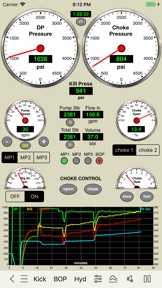
This is a basic drilling simulator that simulates drilling operations based in panels for kick detection, shut-in the well, stabilization of pressures and the choke operations during the well control operations using a hydraulic choke panel simulator.
Features:
1. Drilling, kick detection, shut-in, pressures stabilization and control
2. MULTIPLE KICKS (3 SINGLE BUBBLES)
3. DIRECTIONAL/HORIZONTAL WELL
4. WELL CONTROL ON CHOKE PANEL WITH 2 REMOTE CHOKES
5. Standpipe Manifold and Choke Manifold
6. FLOAT VALVE,
7. GESTURE SWAIPE UP/DOWN TO MOVE DRILLSTRING
8. FAILURES SCHEDULE WITH RANDOM OPTION (Mud Pumps 1 and 2 “power end failure” or “fluid end failure”, Chokes 1 and 2 “plugged” or “washed”, One Drill Bit Nozzle “plugged” or “washed”)
9. Set a KICK without drilling required.
10. Subsea Stack BOP and Surface Stack BOP
Additional features:
1. Optionally it is possible to use others apps as Remote Choke like "Driller's Method Simulator" and "Wait and Weight Simulator". Both are available for sale in our Portfolio.
2. Swabbing effect simulation
This effect occur when the drill string is pulled out of the wellbore to reduce the bottom hole pressure enough to create an underbalance condition and to cause a flow from formation into the wellbore.
This effect is performed on this Simulator by moving the finger up in the well layout on the screen.
iPad version:
1. Pre-recorded data view
2. Screen layout optimized for 12.9-inch iPad Pro (High Resolution)
3. Three codes (default "0000" for all: admin, instructor, student) to view the gas into the borehole, the pressure at bottom, at shoe and at bop and to enable / disable the Lag Time (by adjusting the choke to change the kill pressure and drill pipe pressure, etc).
4. Use the arrow keys on keyboard for iPad Pro to operate the choke.
iPhone version:
1. Pre-recorded data available in the well configuration views.
2. Screen layout optimized for iPhone and iPad Pro (High Resolution)
3. All features available without codes.
A graphical very useful tool for training, drillers, toolpusher, drilling engineers, mud engineers and students in the well control procedures.
- Well configuration, drilling, kick detection, shut-in and control.
- Interactive system: no pre-set methods;
- Ability to apply control methods: Driller's method, Wait and Weight method (or Engineer's method), dynamic volumetric and static volumetric (lubricate and bleed);
- Hydraulics and Hydrostatics;
- Behavior of the kick (until 3 single kick bubbles simultaneously in borehole);
- Applied with subsea stack or surface stack;
- Set well with until 4 sections: riser, casing, liner, open hole ;
- Set Drill String with drill pipe1, drill pipe2, heavy weight, drill collar1, drill collar2
- Support for horizontal and directional wells (builder and plotter)
- Bop flow meter (volume to close and to open bop)
- Gas compressibility factor (Z) calculations using formulas more accurately by Hall and Yarborough (1973)
- Option to select a more didactic choke control mode instead of a more realistic simulation (default)
Others apps available on our portfolio that may be useful for you:
- Drilling Hydraulics
- Kick Tolerance
- Leak-Off Test Simulator
- Leak-Off Test Analyzer
- MPD Simulator
- Well Control Methods
- Well Control Worksheets
- Well Control Simulators specific for each method (Driller's Method, Wait and Weight and Volumetric)
These tools can complement (work with) this simulator by creating files which can be used in this application;
and more Oil & Gas in our website.
DISCLAIMER:
These tools & materials are provided 'as is' without warranties of any kind, express or implied.
Please verify the tools provided by this application by yourself before you use them. Ensure you understand the impact of using these tools.
Any use you choose to make of these tools & materials is undertaken by you entirely at you own risk.
Что нового в версии 4.5
- improved support for connecting to an external choke controller (feature available for the "Driller's Method Simulator" and "Wait and Weight Simulator" apps, both from our portfolio)
- improved user experience in using an external keyboard:
Driler Panel: (TAB key: Pause On/Off, ESC Key: Audio On/Off, Left Arrow: -RPM, Right Arrow: +RPM, Up Arrow: -WOB, Down Arrow: +WOB, "+"/PageUp: +SPM, "-"/PageDown: -SPM)
Choke Panel: (TAB key: Pause On/Off, ESC Key: Audio On/Off, Left Arrow: Open Choke, Right Arrow: Close Choke, Up Arrow: +Choke Rate, Down Arrow: -Choke Rate, "+"/PageUp: +SPM, "-"/PageDown: -SPM)
It is now possible to increase/decrease mud pump speed using an external keyboard in well control practice without handling the instructor's device (iPhone or iPad). Useful for starting/stopping the mud pump by students when using an external application as a choke controller, "Drill Method Simulator" or "Wait and Wait Method Simulator"). Note: Both also work with an external keyboard.
Продавец
Название
Carlos Moura
Адрес страницы
Информация
Разработчик
Категории
Версия
4.5
Размер
38,5 MB
Game Center
Нет
VPP Device Licensing
Да
Рейтинг
Ограничение: 4+
Совместимость
iOS 12.0 или позже
Устройства
iPhone 5s, iPhone 6, iPhone 6 Plus, iPhone 6s, iPhone 6s Plus, iPhone SE, iPhone 7, iPhone 7 Plus, iPhone 8, iPhone 8 Plus, iPhone X, iPhone XR, iPhone XS, iPhone XS Max, iPhone 11, iPhone 11 Pro, iPhone 11 Pro Max, iPhone SE (2-го поколения), iPhone 12, iPhone 12 Pro, iPhone 12 Pro Max, iPhone 12 mini, iPhone 13, iPhone 13 Pro, iPhone 13 Pro Max, iPhone 13 mini, iPhone SE (3-го поколения), iPhone 14, iPhone 14 Plus, iPhone 14 Pro, iPhone 14 Pro Max, iPhone 15, iPhone 15 Plus, iPhone 15 Pro, iPhone 15 Pro Max, iPhone 16, iPhone 16 Plus, iPhone 16 Pro, iPhone 16 Pro Max, iPhone 16e, iPad (5-го поколения) Wi-Fi, iPad (5-го поколения) Wi-Fi + Cellular, iPad (6-го поколения) Wi-Fi, iPad (6-го поколения) Wi-Fi + Cellular, iPad Pro, iPad Pro (Cellular), iPad Pro (9,7-дюймовый), iPad Pro (9,7-дюймовый) (Cellular), iPad Pro (12,9 дюйма, 2-го поколения), iPad Pro (12,9 дюйма, 2-го поколения) Wi-Fi + Cellular, iPad Pro (10,5 дюйма), iPad Pro (10,5 дюйма) Wi-Fi + Cellular., iPad Pro (11 дюйма), iPad Pro (11 дюйма) Wi-Fi + Cellular., iPad Pro (12,9 дюйма, 3-го поколения), iPad Pro (12,9 дюйма, 3-го поколения) Wi-Fi + Cellular, iPad Air, iPad Air (Cellular), iPad Air 2, iPad Air 2 (Cellular), iPad Air (3-го поколения), iPad Air (3-го поколения) Wi-Fi + Cellular, iPad mini Retina, iPad mini Retina (Cellular), iPad mini 3, iPad mini 3 (Cellular), iPad mini 4, iPad mini 4 (Cellular), iPad mini (5-го поколения), iPad mini (5-го поколения) Wi-Fi + Cellular, iPad (7-го поколения) Wi-Fi + Cellular, iPad Pro (11 дюймов, 2-го поколения), iPad Pro (11 дюймов, 2-го поколения) (Wi-Fi + Cellular), iPad Pro (12,9 дюйма, 4-го поколения), iPad Pro (12,9 дюйма, 4-го поколения) (Wi-Fi + Cellular), iPad Air (4-го поколения) (Wi-Fi), iPad Air (4-го поколения) (Wi-Fi + Cellular), iPad (8-го поколения) Wi-Fi, iPad (8-го поколения) Wi-Fi + Cellular, iPad Pro (11 дюймов, 3-го поколения), iPad Pro (11 дюймов, 3-го поколения) (Wi-Fi + Cellular), iPad Pro (12,9 дюйма, 5-го поколения), iPad Pro (12,9 дюйма, 5-го поколения) (Wi-Fi + Cellular), iPad (9-го поколения), iPad (9-го поколения) Wi-Fi + Cellular, iPad mini (6-го поколения), iPad mini (6-го поколения) Wi-Fi + Cellular, iPad Air (5-го поколения), iPad Air (5-го поколения) Wi-Fi + Cellular, iPad Pro (11 дюймов, 4-го поколения), iPad Pro (11 дюймов, 4-го поколения) (Wi-Fi + Cellular), iPad Pro (12,9 дюймов, 6-го поколения), iPad Pro (12,9 дюймов, 6-го поколения) (Wi-Fi + Cellular), iPad (10-го поколения), iPad (10-го поколения) (Wi-Fi + Cellular), iPad Air (11 дюймов, M2, Wi-Fi), iPad Air (13 дюймов, M2, Wi-Fi), iPad Air (13 дюймов, M2, Wi-Fi + Cellular), iPad Pro (11 дюймов, M4, Wi-Fi), iPad Pro (11 дюймов, M4, Wi-Fi + Cellular), iPad Pro (13 дюймов, M4, Wi-Fi), iPad Pro (13 дюймов, M4, Wi-Fi + Cellular), iPad mini (A17 Pro) Wi-Fi, iPad mini (A17 Pro) Wi-Fi + Cellular, iPad (A16) Wi-Fi, iPad (A16) Wi-Fi + Cellular, iPad Air 11-inch (M3) Wi-Fi, iPad Air 11-inch (M3) Wi-Fi + Cellular, iPad Air 13-inch (M3) Wi-Fi, iPad Air 13-inch (M3) Wi-Fi + Cellular, iPod touch (6-го поколения), iPod touch (7-го поколения)
Языки
английский
App Store: Оценки покупателей
Оценки и отзывы
0,0 из 5 (Оценок нет)
App Store: Отзывы покупателей
Пусто