Обновление


Снимки экрана iPhone


Снимки экрана iPad


Описание
When battery was disconnected for vehicle repair.
After battery reconnected and the radio is protected by a four digit code.
If you don't remember radio code or lost and don't find, you can recover it quickly and easily with this app via precode security.
Note: precode security is rear side of head unit radio.
You need step by step:
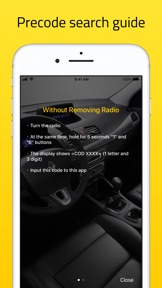
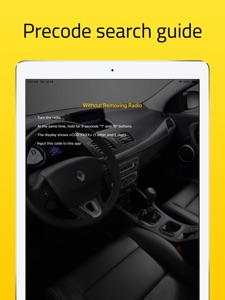
- Remove the stereo from the dashboard
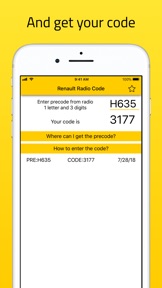
- See the unit precode. Unit pre-code = 1 letter and 3 digit, for example: V248, D833, H635
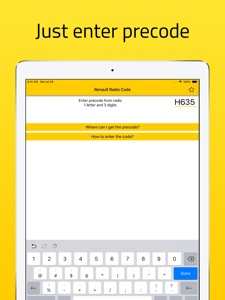
- Input precode to this app
How to input radio code ?
1. With Preset Buttons
・ Press 1 Button repeatedly for 1st digit to be displayed
・ Press 2 Button repeatedly for 2nd digit to be displayed
・ Press 3 Button repeatedly for 3rd digit to be displayed
・ Press 4 Button repeatedly for 4th digit to be displayed
・ Press and HOLD preset button 6 (or 5) to store your code (10 seconds)
2. With Stalk Control
・ Press switch on the CD radio. When CD will display 0 0 0 0.
・ Rotate the thumb wheel for the 1st digit. Next press the bottom button to move on.
・ Rotate the thumb wheel for the 2nd digit. Next press the bottom button to move on.
・ Rotate the thumb wheel for the 3rd digit. Next press the bottom button to move on.
・ Rotate the thumb wheel for the 4th digit.
・ Press and hold the bottom button button to finish.
3. With Remote Control
・ Press the [ ¬] button then rotate the thumb wheel for 1st digit
・ Press the [ ¬] button then rotate the thumb wheel for 2nd digit
・ Press the [ ¬] button then rotate the thumb wheel for 3rd digit
・ Press the [ ¬] button then rotate the thumb wheel for 3rd digit
・ Press and hold the [ ¬] button to store the code (10 seconds)
If you experience difficulties with the app, please contact us.
support@kcandr.ru
Что нового в версии 2.0
- update for dark mode iOS 13
Информация
Разработчик
Категории
Версия
2.0
Размер
17,6 MB
Game Center
Нет
VPP Device Licensing
Да
Рейтинг
Ограничение: 4+
Совместимость
iOS 8.0 или позже
Устройства
iPhone 4S, iPhone 5, iPhone 5c, iPhone 5s, iPhone 6, iPhone 6 Plus, iPhone 6s, iPhone 6s Plus, iPhone SE, iPhone 7, iPhone 7 Plus, iPhone 8, iPhone 8 Plus, iPhone X, iPhone XR, iPhone XS, iPhone XS Max, iPhone 11, iPhone 11 Pro, iPhone 11 Pro Max, iPhone SE (2-го поколения), iPad 2 (Wi-Fi), iPad 2 (3G), iPad (3-го поколения) (Wi-Fi), iPad (3-го поколения) (4G), iPad (4-го поколения) (Wi-Fi), iPad (4-го поколения) (4G), iPad (5-го поколения) Wi-Fi, iPad (5-го поколения) Wi-Fi + Cellular, iPad (6-го поколения) Wi-Fi, iPad (6-го поколения) Wi-Fi + Cellular, iPad Pro, iPad Pro (Cellular), iPad Pro (9,7-дюймовый), iPad Pro (9,7-дюймовый) (Cellular), iPad Pro (12,9 дюйма, 2-го поколения), iPad Pro (12,9 дюйма, 2-го поколения) Wi-Fi + Cellular, iPad Pro (10,5 дюйма), iPad Pro (10,5 дюйма) Wi-Fi + Cellular., iPad Pro (11 дюйма), iPad Pro (11 дюйма) Wi-Fi + Cellular., iPad Pro (12,9 дюйма, 3-го поколения), iPad Pro (12,9 дюйма, 3-го поколения) Wi-Fi + Cellular, iPad Air, iPad Air (Cellular), iPad Air 2, iPad Air 2 (Cellular), iPad Air (3-го поколения), iPad Air (3-го поколения) Wi-Fi + Cellular, iPad mini (Wi-Fi), iPad mini (4G), iPad mini Retina, iPad mini Retina (Cellular), iPad mini 3, iPad mini 3 (Cellular), iPad mini 4, iPad mini 4 (Cellular), iPad mini (5-го поколения), iPad mini (5-го поколения) Wi-Fi + Cellular, iPad (7-го поколения) Wi-Fi + Cellular, iPad Pro (11 дюймов, 2-го поколения), iPad Pro (11 дюймов, 2-го поколения) (Wi-Fi + Cellular), iPad Pro (12,9 дюйма, 4-го поколения), iPad Pro (12,9 дюйма, 4-го поколения) (Wi-Fi + Cellular), iPod touch (5-го поколения), iPod touch (6-го поколения), iPod touch (7-го поколения)
Языки
английский, французский
App Store: Оценки покупателей
Оценки и отзывы
5,0 из 5 (8 Оценки)
App Store: Отзывы покупателей
Пусто