О компанииУсловияКонфиденциальностьКонтакт
 
Обновление
Sketch 3D

Sketch 3D

Выпуск: 2015-08-22
© 2015 - 2020 nurbs-g.com
Sketch 3D - QR Code
Версия 1.38
4+
Загрузите в App Store
Версия 1.38
4+
Загрузите в App Store
Выпуск: 2015-08-22
© 2015 - 2020 nurbs-g.com

Снимки экрана iPhone

Скриншот
Скриншот
Скриншот
Скриншот
Скриншот

Снимки экрана iPad

Скриншот
Скриншот
Скриншот
Скриншот
Скриншот

Описание

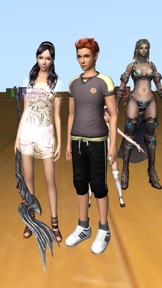
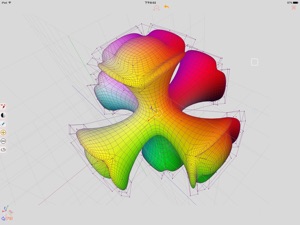
Sketch 3D is a tool for designing 3D models from your fingertips. You could download models from others, and could also share your great designs with other users by saving models in Public space.
New feature: Use True Depth Camera to capture face model.
New feature: Support using video as model texture.
You could use video clips from Photo Album, or from Internet URL (YouTube URL not supported), and then apply it onto a model as texture map.
New feature: Capture movie from the 3D scene.
Note! If your device could not capture movie, then, could try out a smaller output resolution (by tapping the control pane). However, arbitrary output size may stop capturing prematurely.
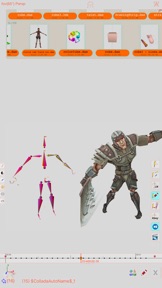
New feature: Design 3D model animation with skeleton structure.
You could design a skeleton structure by placing bones in hierarchical relation. Attach model to the skeleton, and then moving the bones to define different poses. Each pose represented as a keyframe in the timeline view. And animation sequence is produced by playing interpolation between the keyframes.
Features:
- Import 3D content directly from browser or email, either in .zip, .rar, .7z.
- Support formats: Collada DAE, OBJ, 3DS, STL(for 3D printing), and others.
- Import/export to iCloud drive, via iTune File Sharing, or to Public area via Apple CloudKit Service.
- Supports AirDrop.
- Support Quad faces.
- Smooth surfaces using Subdivision.
- Mirroring editing.
- 2-fingers vertex movement, 3 or 4-fingers planar shape creation.
- Versatile multi-touches drag-through-space gestures to support editing and changing viewing angle at the same time.
- Flexible face strip drawing.
- Stitching boundary faces. Stitch triangle soap into connected faces. Stitch over edge or vertex to form a larger face.
- Stitching Triangles to Quads.
- Loop Cut faces.
- Bevel edges.
- Extrude faces or edges.
- Revolve (Spin).
- Vertex Smoothing.
- Vertex Slide along edges.
- Crease Editing after mesh subdivision.
- Split mesh from, or Join mesh to the editing one.
- Support hierarchical mesh node structure.
- Direct vertex color editing when texture map is not used.
- Edit texture map UV coordinates, include atlas generation.
- 3D Text generation.
- Scene interaction with your created shape.
- Design Animation with skeleton structure.
- Capture movie from the 3D scene.
- Support using video as model texture map.

Что нового в версии 1.38

- Modified iCloud view to handle too many iCloud models in private view.  
- Revised the camera movement limits when setting the viewing style of Turntable mode.  
- Modified the Timeline view allow zooming out without limit, and provide sliding gesture.  
- Fixed non-responding output size changes of the Movie capturing view.

Продавец

Название

Victor Ng

Адрес страницы

Информация

Разработчик

Категории

Версия

1.38

Размер

56,1 MB

Game Center

Да

VPP Device Licensing

Да

Рейтинг

Ограничение: 4+

Совместимость

iOS 7.1 или позже

Устройства

iPhone 4, iPhone 4S, iPhone 5, iPhone 5c, iPhone 5s, iPhone 6, iPhone 6 Plus, iPhone 6s, iPhone 6s Plus, iPhone SE, iPhone 7, iPhone 7 Plus, iPhone 8, iPhone 8 Plus, iPhone X, iPhone XR, iPhone XS, iPhone XS Max, iPhone 11, iPhone 11 Pro, iPhone 11 Pro Max, iPhone SE (2-го поколения), iPhone 12, iPhone 12Mini, iPhone 12Pro, iPhone 12ProMax, iPad 2 (Wi-Fi), iPad 2 (3G), iPad (3-го поколения) (Wi-Fi), iPad (3-го поколения) (4G), iPad (4-го поколения) (Wi-Fi), iPad (4-го поколения) (4G), iPad (5-го поколения) Wi-Fi, iPad (5-го поколения) Wi-Fi + Cellular, iPad (6-го поколения) Wi-Fi, iPad (6-го поколения) Wi-Fi + Cellular, iPad Pro, iPad Pro (Cellular), iPad Pro (9,7-дюймовый), iPad Pro (9,7-дюймовый) (Cellular), iPad Pro (12,9 дюйма, 2-го поколения), iPad Pro (12,9 дюйма, 2-го поколения) Wi-Fi + Cellular, iPad Pro (10,5 дюйма), iPad Pro (10,5 дюйма) Wi-Fi + Cellular., iPad Pro (11 дюйма), iPad Pro (11 дюйма) Wi-Fi + Cellular., iPad Pro (12,9 дюйма, 3-го поколения), iPad Pro (12,9 дюйма, 3-го поколения) Wi-Fi + Cellular, iPad Air, iPad Air (Cellular), iPad Air 2, iPad Air 2 (Cellular), iPad Air (3-го поколения), iPad Air (3-го поколения) Wi-Fi + Cellular, iPad mini (Wi-Fi), iPad mini (4G), iPad mini Retina, iPad mini Retina (Cellular), iPad mini 3, iPad mini 3 (Cellular), iPad mini 4, iPad mini 4 (Cellular), iPad mini (5-го поколения), iPad mini (5-го поколения) Wi-Fi + Cellular, iPad (7-го поколения) Wi-Fi + Cellular, iPad Pro (11 дюймов, 2-го поколения), iPad Pro (11 дюймов, 2-го поколения) (Wi-Fi + Cellular), iPad Pro (12,9 дюйма, 4-го поколения), iPad Pro (12,9 дюйма, 4-го поколения) (Wi-Fi + Cellular), iPad Air (4-го поколения) (Wi-Fi), iPad Air (4-го поколения) (Wi-Fi + Cellular), iPad (8-го поколения) Wi-Fi, iPad (8-го поколения) Wi-Fi + Cellular, iPod touch (5-го поколения), iPod touch (6-го поколения), iPod touch (7-го поколения)

Языки

русский, английский, китайский

App Store: Оценки покупателей

Оценки и отзывы

3,0 из 5 (20 Оценки)

App Store: Отзывы покупателей

2020-02-04

Ничего не понятно

Уважаемые разработчики не понятно как пользоваться приложением даже с вашими подсказками. Я элементарно не могла удалить фигуру, тыкала тыкала в итоге оказалась в красивом, но непонятном месте из которого выйти обратно нельзя! Серьезно испробовала все кнопки нажимать. Бред.
Лиса_из-Леса
Версия 1.36
2020-01-18

Клёво, спасибо разраб

Пока учусь что к чему, но в целом приложение шик
Франсуа дэ Нагибатор
Версия 1.36
2019-08-09

😢

Не фига не разобралась! Разработчики сделайте что-нибудь по легче!
🥺😩😖😣😫😢😭😠😡🤬
Версия 1.36
2019-08-05

Подсказки❌

Нечего не смогла сделать только удлинить и всё! Подсказки? А зачем? Это очень сложная программа они справятся! (Нет) жду теперь компьютер для анимации.
Кира Л.
Версия 1.36
2019-06-01

Аааааааа

Ааааааааа сложнаааааааааааааааа
GAZ_masochnik
Версия 1.36
2019-03-09

Прикольно, но я пас

Интуитивно не понятный интерфейс, мелкие кнопки, нормальных подсказок нет, и потыкавшись минут 10 так и не нашла режим обучения
Aleka Kalm
Версия 1.32
2019-01-17

Сложный интерфейс

Программа годная, но интерфейс очень неудобен. Мелкие значки и тому подобное. В принципе можно привыкнуть, но на это нужно время.
Efim292000
Версия 1.32
2018-09-11

.

Ничего не понял, но очень интересно
luchok441
Версия 1.32
2018-05-16

Требуется Подготовка

Разобраться Непросто. Ничего не понял:) Ухожу. Времени на обучение нет.
777XTREME
Версия 1.28
2018-03-12

Егор👻

Программа не плохая, много возможностей, но по началу сложно разобраться. Для того, чтобы убить время в самый раз, но довольно полезно, можно поработать над различными дизайнами, или же анимации. Вообщем продукт получился годный🙂
Егор🤖👾
Версия 1.26